What Official PS2 controllers are best for making arcade stick?

greedostick

Kyukyogenryu Black Belt
20 Year Member
Joined
Aug 11, 2003
Posts
4,939
I can't seem to find this online. But I remember one of the versions of the ps2 controller have less lag when pressing the buttons after converting them to a arcade stick. I remember you look on the back at the SPCH- Whatever it says, to determine which is the best. Can someone please help me here. I need to get my arcade stick ready for Street Fighter IV.

Also, is there someone here who could solder the wires to the controller PCB for me? I would be willing to pay whatever amount is fair. I don't need you to hook it to my arcade stick. I just need the PCB soldered. I am so awful at soldering.
 

Xian Xi

JammaNationX,
15 Year Member
Joined
Dec 1, 2005
Posts
27,762
I'm pretty sure it's the analog ones that came with the PS1.
 

norton9478

So Many Posts
No Time
For Games.
20 Year Member
Joined
Oct 30, 2003
Posts
34,075
Yeah, PS1 controllers....

Official or not


Sadly, Gamestores don't take them in anymore... But if you ask, they might have some in the trash... Or they might hold them for you.

I got mine by asking, and there was some dude there trying to trade them in at the same time.
 

greedostick

Kyukyogenryu Black Belt
20 Year Member
Joined
Aug 11, 2003
Posts
4,939
Nah, that's not it. I don't mean easiest to modify. There is a certain model of the official ps2 controllers that when modded for an arcade stick, have no lag when pressing the arcade stick buttons. You look on the back of the controller at the SCPH- and then it will have a letter like G, or H. There is one model that is better than the other. I think I will just have to register at shoryuken and ask around.
 

max 330 megafartz

The Almighty Bunghole
20 Year Member
Joined
Dec 14, 2004
Posts
6,435
if you do find the answer, please post it here, i am soon to be modding my stick for SF IV and need to know the same thing.
 

greedostick

Kyukyogenryu Black Belt
20 Year Member
Joined
Aug 11, 2003
Posts
4,939
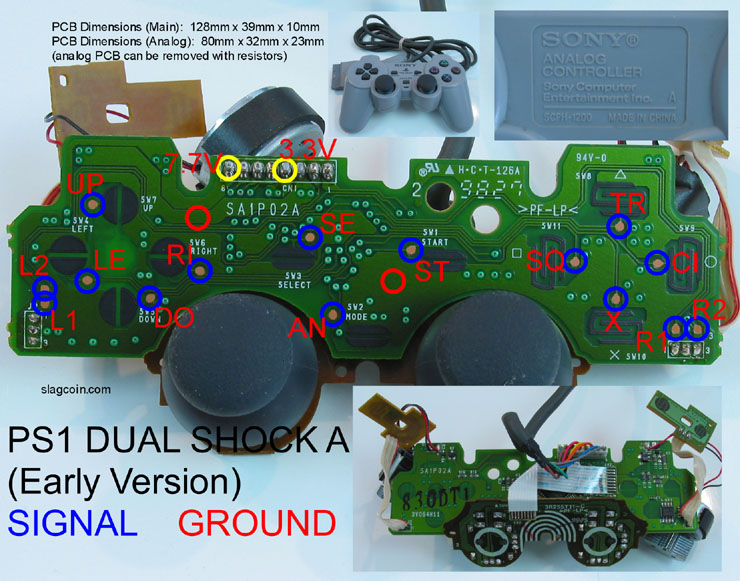
Slagcoin seems to have a pretty good PCB page

http://www.slagcoin.com/joystick/pcb_wiring.html

Does anyone understand these diagrams? Example: I am looking at the ps1 dual shock A (early version) diagram. What are the yellow circles for? And 2: What exactly do I do if there is 2 different ground points? I know they have to be all connected and soldered to the push buttons, but does one of the grounds just connect to a certain set of buttons, and the other to another set of buttons. Or can I just use one of the grounds and connect it to all the buttons?

The stick I am using now just looks like it has a thick copper wire connecting all the buttons, and doesn't look like it connects to the pcb at all. Would it just be an easier alternative to use copper wire to connect to all the grounds on the pushbuttons,
and then just solder the actual points on the PCB for the buttons, to the arcade buttons seperately?
 

greedostick

Kyukyogenryu Black Belt
20 Year Member
Joined
Aug 11, 2003
Posts
4,939
By solid core are you talking a about the copper wire? He was in a hurry to get to work and wanted me to at least be able to use the stick. So maybe cause he was in a hurry, or just didn't care. We never even got the start and select buttons to work, which is kind of a pain. Is there something wrong with using 1 single coper wire? He said that is the way massystems does it. Unfortunately we lost contact, so I am kinda stuck now.
 

norton9478

So Many Posts
No Time
For Games.
20 Year Member
Joined
Oct 30, 2003
Posts
34,075
Nah, that's not it. I don't mean easiest to modify. There is a certain model of the official ps2 controllers that when modded for an arcade stick, have no lag when pressing the arcade stick buttons. You look on the back of the controller at the SCPH- and then it will have a letter like G, or H. There is one model that is better than the other. I think I will just have to register at shoryuken and ask around.

So you are saying that some official Ps1/2 controllers have a delay when used on a PS2/PS1?

The fact that you are putting it in an Arcade stick makes no difference.

I can imagine the possibility that certain controllers have more/less delay with converters and shit....
 

greedostick

Kyukyogenryu Black Belt
20 Year Member
Joined
Aug 11, 2003
Posts
4,939
So you are saying that some official Ps1/2 controllers have a delay when used on a PS2/PS1?

The fact that you are putting it in an Arcade stick makes no difference.

I can imagine the possibility that certain controllers have more/less delay with converters and shit....

I was reading online and it says that it is only fractions of a second, and is normally with cheap 3rd party controllers. I am just gonna stick to using a official ps1 controller for now.
 
Joined
Nov 24, 2001
Posts
144
The most popular controllers for custom sticks are PS1 Dual Shocks, either the A-series (solderless) or the H series which requires soldering. There is no lag with either of these.

I don't think anyone uses PS2 pads for hacking. I don't think it is possible easily because the buttons are all analog, or somesuch. But PS1 dual shocks are by FAR the most common pcb's in custom sticks.

If you want you can send your stick to me and I can put a PS1 pcb into it for you for around 30 dollars depending on what type of stick it is (I don't like to even touch EX2/Doa4 sticks, meh). If your stick has actual arcade parts in it, I can put quick disconnects on them so in the future if your stick or buttons fail you can swap them out without any soldering. Just PM me if interested. :)
 

greedostick

Kyukyogenryu Black Belt
20 Year Member
Joined
Aug 11, 2003
Posts
4,939
Thanks for the info. I'll have to check out my game store and see if I can find one.
 

norton9478

So Many Posts
No Time
For Games.
20 Year Member
Joined
Oct 30, 2003
Posts
34,075
Thanks for the info. I'll have to check out my game store and see if I can find one.

Yeah, talk to the guy...

See if he/she can hold one for you...

Most stores don't take them in trade... or junk them...
 

greedostick

Kyukyogenryu Black Belt
20 Year Member
Joined
Aug 11, 2003
Posts
4,939
OK, So I got a PS1 Dual Shock Revision A controller now. This all looks pretty simple, except for the ground wire(s). I don't understand how I connect to these on the controller. If you look at the pic on the bottom of the post, you see there are 2 points on the controller that are labeld "ground". But there right in the middle of the PCB? Do I have to scratch off this portion of the PCB to get to these ground connections? And do I even need to use both of them? Can someone give me detailed instructions on how I connect to these? The blue circles are easy enough, just solder wires to these points on the PCB, and connect them to the push buttons.

I do understand the ground concept a little. I understand that these need to make a loop and connect to all the buttons. But do I need to start at "X" for example, and loop it to all the wires and end at "X" again, or do I need to start at "X", and loop it to all the buttons, and end say at "O" and only touch "X" one time? Hopefully you all understand what I am asking, I know it sounds confusing the way I am explaining it.

Also, what are the yellow circles for? Am I going to need to use these for anything?

Finally, I read online that if I hook up the analog button to my arcade stick, it will be used as the PS button, allowing me to turn the system off, or leave a game. Is this true?

ps1_diagram8.jpg
 

Xian Xi

JammaNationX,
15 Year Member
Joined
Dec 1, 2005
Posts
27,762
Scratch it and then solder to it. Don't worry about the yellow circles you don't need them.

For the analog button you can but you would have to route the system power button wiring to the arcade stick and to the PCB.
 
Last edited:

greedostick

Kyukyogenryu Black Belt
20 Year Member
Joined
Aug 11, 2003
Posts
4,939
Thanks! I'm gonna try it this weekend and see how it goes.
 
Joined
Nov 24, 2001
Posts
144
Think of the grounds as a baseline so that when the other prong connects to the powered wire, it can tell that one is higher than the other. So you only need to loop it to one button once, it doesn't have to be a complete circuit or loop, so X only needs to touch the ground wire one time.
 
Joined
Nov 24, 2001
Posts
144
BTW, the yellow circles are points on the PCB you can tap for the listed voltages. The 3.3v is important because you can use that to power an optical stick like the Happ 360 which is listed at 5volts, but works fine at the PSX's 3.3v.

The only other stick that needs power is a discontinued Sanwa flash stick that goes for around 100 bucks each (just on the stick mechanism). And I guess if you want to do LED mods on your stick also.

About grounds, you can get a wire from any ground point, and then loop that to every part of the buttons/sticks, you don't need two solder points for each button. This is called "common ground" because the parts all share the same grounds. Some PCB's like the Tekken 5 are not common ground for directionals, so you have to do some hackery to use Sanwas.

Finally, I read online that if I hook up the analog button to my arcade stick, it will be used as the PS button, allowing me to turn the system off, or leave a game. Is this true?

Do you mean on a PS3? It will only do whatever pressing the analog button does if you hook a PSX pad up to it, I don't have a PS3 but if you do this should take 1 second only to test.
 
Last edited:

greedostick

Kyukyogenryu Black Belt
20 Year Member
Joined
Aug 11, 2003
Posts
4,939
Thanks for the help everyone, I tried this earlier today and nothing happened. I tried drilling holes in the pcb using a 1mm drill bit. Maybe that was the problem. I am going to give it another try in a few days (no drilling). Last time I tried I got almost all the buttons to work. Looks like I am not making good progress.
 
Joined
Nov 24, 2001
Posts
144
Thanks for the help everyone, I tried this earlier today and nothing happened. I tried drilling holes in the pcb using a 1mm drill bit. Maybe that was the problem. I am going to give it another try in a few days (no drilling). Last time I tried I got almost all the buttons to work. Looks like I am not making good progress.

What do you need to drill for? And what do you have working and what doesn't work? Once you figure it out, it will seem so simple that you will wonder why you didn't get it, and then you will be an addict. :buttrock:
 

norton9478

So Many Posts
No Time
For Games.
20 Year Member
Joined
Oct 30, 2003
Posts
34,075
You can't use the 3.3 to power a New Style Neo Stick...

It will work, but if you push more than 3 buttons, it will make your TV screen go black.
 

greedostick

Kyukyogenryu Black Belt
20 Year Member
Joined
Aug 11, 2003
Posts
4,939
What do you need to drill for? And what do you have working and what doesn't work? Once you figure it out, it will seem so simple that you will wonder why you didn't get it, and then you will be an addict. :buttrock:

The articles online I read said you can drill the connection points on the PCB, so I tried that. The first time I ever tried this I used a ps2 controller and got all the buttons to work except the R and L buttons. The second time I used a third party ps1 controller and got everything except start and select to work. This time none of the buttons worked. So either the ground was messed up, or we broke the controller drilling it.

The whole problem here is me not understanding the ground. On the pic in the previous post there are 2 ground points, so as far as I can understand I start at one ground point on the controller, then loop it to all the push buttons ( in no particular order). Basically as long as they touch every buttons once i'm good. And make sure after looping to all the buttons, they end at the 2nd groind point on the controller.

Do the points on the controller have to be exact? Or will I be OK, as long as I am in the general area? Also, why do they choose the points they do? The point on the right seems good, but the point on the left doesn't leave much room for scraping. I would feel more comfortable scraping somewhere in the bottom left region of the controller, where I don't have to worry about scraching one of those lines on the PCB off.
 

norton9478

So Many Posts
No Time
For Games.
20 Year Member
Joined
Oct 30, 2003
Posts
34,075
Best place to get your ground is the connector where the 3.3 and 7/7 is....
 
Top