Ground loop isolator circuit for audio out

MtothaJ

Host for Orochi
10 Year Member
Joined
Apr 15, 2013
Posts
756
Has anybody got a workable schematic for a ground loop isolator (hum eliminator) circuit for audio out? There is some bits and piecies available on the net but can't really find anything proven / tried and tested and suitable for our gaming applications.
I know there are fairly cheap ready made solutions one can buy but I thought it might be neat to add this to a scart switch box as an option for setups which generate a lot of speaker hum - any ideas would be welcome.
 

MtothaJ

Host for Orochi
10 Year Member
Joined
Apr 15, 2013
Posts
756
Has anybody got a workable schematic for a ground loop isolator (hum eliminator) circuit for audio out? There is some bits and piecies available on the net but can't really find anything proven / tried and tested and suitable for our gaming applications.
I know there are fairly cheap ready made solutions one can buy but I thought it might be neat to add this to a scart switch box as an option for setups which generate a lot of speaker hum - any ideas would be welcome.

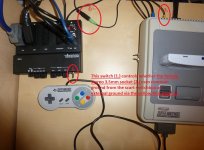
Just in case anybody runs into a similar problem a workable DIY solution not involving any external isolators / eliminators, which I found to work was:
- adding a female 3.5mm stereo audio socket to the scart switch box, wiring the L and R channels to the switch box and the ground of that audio socket to the middle od a SPDT switch
- to one of the terminals I wired the common switch box ground and to the other a cable ending with a male RCA connector (but bear in mind that we are just interested in connecting the ground, not the signal part) for 'audio external ground'. You can then plug that 'audio external ground' into the input device generating the sound e.g. into the RF jack of a SNES or Mega Drive and select the 'audio external ground' via the switch.
It actually works really well e.g. on a SNES, which was generating a high pitched whine at high volume e.g. when browsing folders on an Everdrive and also a lot of hum / buzz when the volume was cranked up pretty loud (mightly annoying) flicking the switch makes a world of difference.
Give your setup a test and see whether your setup is generating any buzzing / hum - its a pretty common occurance with the amount of different stuff all connected together and if needed give the above a try. If you want to keep things simple you could skip the switch part and just hardwire the socket for external audio ground and use the scart switch box RCA audio outs in case you want to revert to using the common ground for the audio.

 
Last edited:

GoosehanX

Horrible Goose
20 Year Member
Joined
Sep 28, 2001
Posts
13,250
I would be interested in this too, my Genesis creates some nasty hum with my switchbox. I had to hook a Sega CD and run RCA out directly to the stereo to keep my sanity.
 

MtothaJ

Host for Orochi
10 Year Member
Joined
Apr 15, 2013
Posts
756
I would be interested in this too, my Genesis creates some nasty hum with my switchbox. I had to hook a Sega CD and run RCA out directly to the stereo to keep my sanity.

Definitely worth giving it a try. I guess if one wouldn't want to mod the actual switch box its possible just to make a cable going from 2 x RCA on the switchbox side to 2 x RCA or 3.5mm jack/socket and break and rewire / divert the ground connection in that cable so as to be able to connect the ground from an external device. One thing which doesn't work is leaving the audio ground unconnected / floating - barely audible audio and noise / buzzing so relentless it will give you an instantaneous headache.

The hum or a part of it may also be down to the actual scart cable used to connect the console. With the SNES, prior to getting the official Nintendo RGB cable I had some third party ebay one which induced a tremendous amount of noise into the audio. It turned out that even though the cable had the audio lines screened that screening was inadequate. I resolved this by opening up both ends of the cable and running the audio in a separate cable external to the scart cable.
For the Mega Drive I am using the official Sega RGB cable, but since mine is a Model 1 with no stereo sound via the AV connector I modded the console to get line out audio through a 3.5mm socket and then modified the official cable by tapping into the audio on the Scart plug and running that externally via a audio cable ending with a 3.5mm jack to connect to the audio on the console.
 
Last edited:

ne7

Geese's Thug
15 Year Member
Joined
Aug 12, 2008
Posts
272
I was going to build one for a Raspberry Pi that outputted terrible hum thru analogue out, but ended up just ebaying a metal cased isolator for around 7£: cheaper than putting one together!
 

MaxWar

n00b
Joined
Jul 28, 2013
Posts
10
I really like this external ground switch idea, something I might want to try one day.

I personally bought a Behringer HD400 hum destroyer and it works marvels.
 

MtothaJ

Host for Orochi
10 Year Member
Joined
Apr 15, 2013
Posts
756
I really like this external ground switch idea, something I might want to try one day.

I personally bought a Behringer HD400 hum destroyer and it works marvels.

Below a quick pic of what this setup looks like in practise:

switchbox mod2.jpg

What is interesting that I do not have to keep switching the yellow RCA plug into different devices - I can keep it plugged into the SNES with the SNES switched off and e.g. switch on a DVB-T TV decoder or another console and I still get the same excellent results - flicking the switch kills all hum / buzz. If I get a moment I will make a quick video so you can see for yourself.
 

MtothaJ

Host for Orochi
10 Year Member
Joined
Apr 15, 2013
Posts
756
What do you mean?

A possible way to get rid of a ground loop is to break the additional ground connections which are creating the loop. In the case of my particular setup it seems that the ground loop is caused by the monitor being connected to the switch box by way of four RCA cables (R, G, B, Sync) each having a signal and a ground connection. So in theory one could cut the ground connections on e.g. R, G, B lines leaving just the Sync ground as the ground connection between the two devices (in case anybody is wondering Sony PVM / BVM monitors and Scart RGB TV's are both common ground devices).
In practice this method has numerous drawbacks - e.g. when connecting the cables you would have to remember to always connect the grounded Sync line first else you basicly have a connection with a floating ground which can damage e.g. speakers; cutting the shielding could introduce additional interference into the signal lines, you would need to hack up 3 cables to give it a try and ultimately because there can be multiple ground loops in one setup doing all of the above still does not guarantee you will get rid of the problem.

PS. I want to implement a similar solution for my Sony CRT TV (its not too buzy but still annoying once you find out you can get rid of the buzz completely) but so far am struggling to find a pracitcal solution. Its connected via Scart RGB, and since the TV has built in speakers and the scart socket is common ground on the TV end the above solution can not be utilised. I don't want to fcuk about with external speakers etc. since I want to keep the convienience of operating everything with a remote. Any ideas on how to tackle this?
 
Last edited:

Xian Xi

JammaNationX,
15 Year Member
Joined
Dec 1, 2005
Posts
27,762
What do you mean?

Think of the shielding as say a forcefield that goes around both devices, it only stays on the outside. If the hum is being transfered to the shielding form one device, you need to disconnect the shielding in the cable at the end point to stop the hum. That way the other device's shielding isn't connected to the other device's shielding. This happens sometimes when some equipment isn't connected to a correct field ground like houses that have old wiring.

Also make sure all the device are plugged into the same outlet source. Sometimes a ground loop is caused by crossing two outlets especially if they are on different breakers. So if you have a console plugged into outlet A and then your PVM plugged into outlet B on the other wall, depending on how it's wired it can cause a ground loop.
 

GoosehanX

Horrible Goose
20 Year Member
Joined
Sep 28, 2001
Posts
13,250
So, if my Genesis is the only system that's humming, if I open up the scart cable and clip the ground wire soldered to the scart shielding it may eliminate my hum?
 

MtothaJ

Host for Orochi
10 Year Member
Joined
Apr 15, 2013
Posts
756
One thing to take into account is that humming doesn't necessarily mean there is a ground loop. It can also happen e.g. if you got dodgy scart cabling inducing a lot of cross talk / interference into the audio e.g. the third party SNES scart cable available on ebay is notorious for this (hum / buzz intensifies on a bright background). A solution in such a case is to tap into the plugs at both ends of the cable and divert the audio lines to run in a separate cable outside of the scart cable.
 

mikejmoffitt

Mickey's Coach
Joined
Feb 6, 2014
Posts
578
So, if my Genesis is the only system that's humming, if I open up the scart cable and clip the ground wire soldered to the scart shielding it may eliminate my hum?

If you're using a third-party replacement power supply, try finding a different one. I have had Genesis systems have less hum on the original linear power adapters. A good switching power supply is fine, but the cheap light-weight ones often introduce buzz.
 

Xian Xi

JammaNationX,
15 Year Member
Joined
Dec 1, 2005
Posts
27,762
So, if my Genesis is the only system that's humming, if I open up the scart cable and clip the ground wire soldered to the scart shielding it may eliminate my hum?

A customer of mine who had me rewire a banbridge scart box to JP21 kept saying that the box was making a humming sound and he just recently realized the humming was coming from his Genesis. He got another Genesis and it was hum free. You might need a recap for maybe some mylars and filtering caps.
 

Xian Xi

JammaNationX,
15 Year Member
Joined
Dec 1, 2005
Posts
27,762
One thing to take into account is that humming doesn't necessarily mean there is a ground loop. It can also happen e.g. if you got dodgy scart cabling inducing a lot of cross talk / interference into the audio e.g. the third party SNES scart cable available on ebay is notorious for this (hum / buzz intensifies on a bright background). A solution in such a case is to tap into the plugs at both ends of the cable and divert the audio lines to run in a separate cable outside of the scart cable.

You don't need to do it like that. You can just run 2 ground from the socket and have them separated in the SCART hood. I've done that many times. For best results, I use a cable that I make 2 ground and 1 shielding all connected together at the socket then the shielding is broken at the scart socket and the one ground goes to video and the other to audio.
 

MtothaJ

Host for Orochi
10 Year Member
Joined
Apr 15, 2013
Posts
756
You don't need to do it like that. You can just run 2 ground from the socket and have them separated in the SCART hood. I've done that many times. For best results, I use a cable that I make 2 ground and 1 shielding all connected together at the socket then the shielding is broken at the scart socket and the one ground goes to video and the other to audio.

Do you have any ideas what I can do with regards to my TV? I tried running a seperate external ground from the device to the audio ground pin on the scart plug but as expected this is of no use since ultimately all the grounds are linked together on the TV side.
Save for opening up the TV and following the audio traces to the speakers and tapping into the ground there I don't have a clue on how to proceed with this.
 

Xian Xi

JammaNationX,
15 Year Member
Joined
Dec 1, 2005
Posts
27,762
Do you have any ideas what I can do with regards to my TV? I tried running a seperate external ground from the device to the audio ground pin on the scart plug but as expected this is of no use since ultimately all the grounds are linked together on the TV side.
Save for opening up the TV and following the audio traces to the speakers and tapping into the ground there I don't have a clue on how to proceed with this.

Does the TV hum with everything you tried to connect (Other consoles, devices)?
 
Top