138 in 1 mod for multi-slot

wiseman9986

Krauser's Shoe Shiner
Joined
Jan 18, 2003
Posts
229
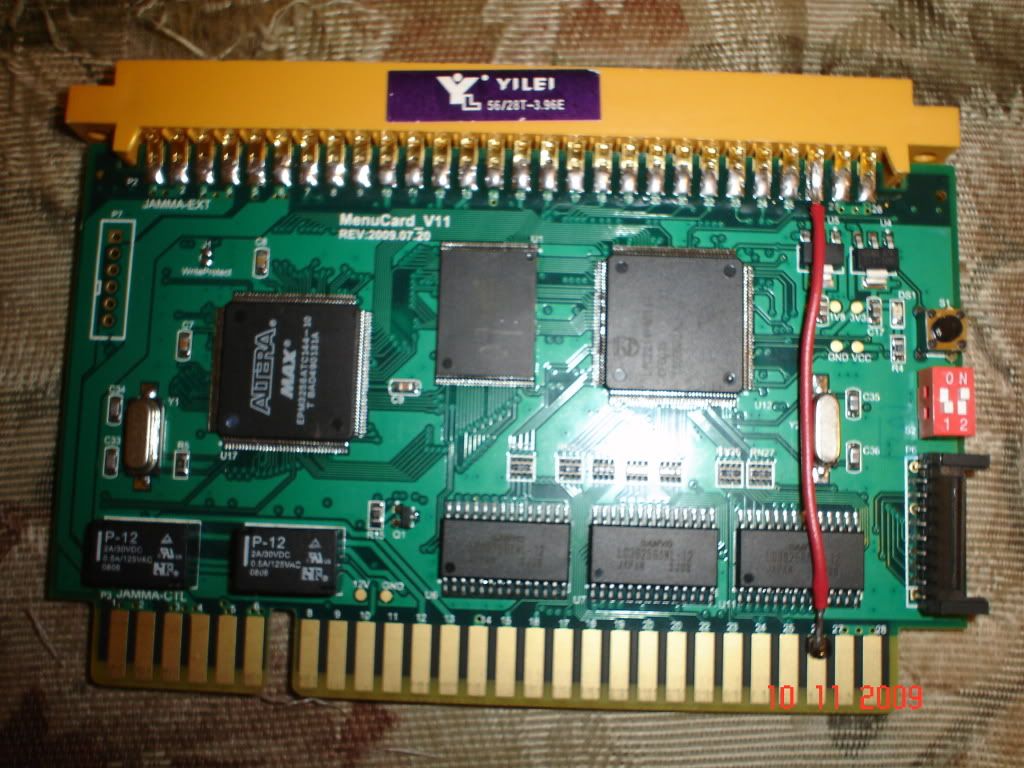
i got the 138 in 1 to work on my 4-slot and i can use the select button heres what i did to fix the select button issue it was a very easy fix i dont understand why they dont have it connected already hope this helps anyone else who has one
DSC01289.jpg
 

cabear

n00b
Joined
Oct 26, 2009
Posts
37
that's cool that you figured that out!

do you think this would work on an AES system too?
 

wiseman9986

Krauser's Shoe Shiner
Joined
Jan 18, 2003
Posts
229
no bc the 138 in 1 has a jamma harness that has to be plugged in that is what is in the pic the other all in one carts might im not sure i just got this one yesterday
 

Murray

Akari's Big Brother
Joined
Aug 16, 2005
Posts
2,533
Since that thing's JAMMA, does it make the sound output mono? How is your cabinet (or supergun) wired?
 

wiseman9986

Krauser's Shoe Shiner
Joined
Jan 18, 2003
Posts
229
i dont know if its jamma wired or not i think its just designed for single slots but the sound must run through the harness bc my sound is wired up to another spot on the board where the sound for the memory card reader comes out and it works fine but i got a memory card reader that ill be installing soon and ill find out then when i rewire the sound

i also had to take my unibios out before that i kept getting errors but mine was kinda old ver. 2.3 i believe
 
Last edited:

wiseman9986

Krauser's Shoe Shiner
Joined
Jan 18, 2003
Posts
229
i may be wrong i have read somewhere that it works well with unibios and i did have the free play dip switch in the on position and i dont anymore and i dont want to but the unibios back in ill order the new 3.0 sometime and tell everyone how it works
 

sloth911

n00b
Joined
Nov 26, 2009
Posts
10
I have installed the 138-in-1 into my two slot MVS cabinet. I have managed to add/delete games, turn on free play, and play about 30+ games with little problems.

I am intersted in installing the unibios so I can use the cheat code feature of the unibios with the 138-in-1 games.

Has anybody actually tried this? will it work?
 

alphagamer

Aero Fighters Flyboy
Joined
Jun 7, 2009
Posts
2,091
I have installed the 138-in-1 into my two slot MVS cabinet. I have managed to add/delete games, turn on free play, and play about 30+ games with little problems.

I am intersted in installing the unibios so I can use the cheat code feature of the unibios with the 138-in-1 games.

Has anybody actually tried this? will it work?

Don't know about the 138in1 but it works on the 100in1.
 

Syn

There can be only one.
Joined
Jan 21, 2009
Posts
9,217
I have installed the 138-in-1 into my two slot MVS cabinet. I have managed to add/delete games, turn on free play, and play about 30+ games with little problems.

I am intersted in installing the unibios so I can use the cheat code feature of the unibios with the 138-in-1 games.

Has anybody actually tried this? will it work?

They say on the jammaboards site to use a regular bios.

I can let you know after my supergun is made if no one else answers. That could take a few weeks as someone is making it for me.

Any graphic or sound issues that you've noticed?

If you have other MVS games the unibios is awesome:buttrock:
 

Neo Alec

Legendary Member?
25 Year Member
Joined
Dec 7, 2000
Posts
14,975
The new cart doesn't work at all without this jamma adapter plugged in, huh? For my consolized system does that mean I can just shove it on the end of the board and not connect to anything, or do I have to run it through jamma to make this work?

Just curious about the technology. I have no plan to buy one of these at this point, although someday when they reach more or less the limit of how many games are included, I may buy one just to try playing around with some of the crappy hacked roms.
 

Syn

There can be only one.
Joined
Jan 21, 2009
Posts
9,217
The new cart doesn't work at all without this jamma adapter plugged in, huh? For my consolized system does that mean I can just shove it on the end of the board and not connect to anything, or do I have to run it through jamma to make this work?

Just curious about the technology. I have no plan to buy one of these at this point, although someday when they reach more or less the limit of how many games are included, I may buy one just to try playing around with some of the crappy hacked roms.

It didn't work on my cmvs so I'm having a supergun made.

If you want to mod your cmvs more it would work. You need to grab the video off of the carts jamma edge.

Plus it says you have to use a regular bios. I will be testing that claim soon.
 

Neo Alec

Legendary Member?
25 Year Member
Joined
Dec 7, 2000
Posts
14,975
It didn't work on my cmvs so I'm having a supergun made.

If you want to mod your cmvs more it would work. You need to grab the video off of the carts jamma edge.

Plus it says you have to use a regular bios. I will be testing that claim soon.
Screw that. I'm not modding for some shitty bootleg cart. Maybe if they still make a cart that doesn't need the jamma adapter, I'll try it.
 

sloth911

n00b
Joined
Nov 26, 2009
Posts
10
The 138-in-1 is the only cart that has the special Jamma connector. The others with less games don't.
 

Neo Alec

Legendary Member?
25 Year Member
Joined
Dec 7, 2000
Posts
14,975
The 138-in-1 is the only cart that has the special Jamma connector. The others with less games don't.
Right. I bet they'll continue that trend though, since they introduced the technology.
 

Syn

There can be only one.
Joined
Jan 21, 2009
Posts
9,217
Right. I bet they'll continue that trend though, since they introduced the technology.

Agreed! It'll be interesting to see what this can lead to.

Kind of like metallizer said, I just happy that companies still see the MVS as a market opportunity:buttrock:
 

blackbag

n00b
Joined
Dec 16, 2009
Posts
7
Can anyone explain why there is an additional jamma board on the 138 in 1 cart where all previous X in 1 carts did not need them? Is this a requirement for some additional games due to copy protection?
 

ack

Mickey's Coach
15 Year Member
Joined
Apr 9, 2009
Posts
578
Right. I bet they'll continue that trend though, since they introduced the technology.

Agreed! It'll be interesting to see what this can lead to.

Kind of like metallizer said, I just happy that companies still see the MVS as a market opportunity:buttrock:

Its actually old technology that they tried back in the 8in1 days.

http://www.neo-geo.com/forums/showpost.php?p=2174441&postcount=11
http://mvs.gotwalls.com/index.php/Super_8_in_1_Multigame_Series_6

-ack
 

klargon

n00b
Joined
Aug 14, 2005
Posts
35
Sorry to be a pain in the ass (I've already posted this in the 150-in-1 thread). I've just got a 138-in-1. Does this mod need to be done to access the service menu on a 1-slot? The thread title seems to suggest it's just a multi-slot problem. I'm having trouble figuring out how to get the difficulty options up. I've set the 1 switch to on and powered it up, then pressed start, select and the bios call, and I still don't get any change to what's displayed in the top-right panel. Can someone explain to me how I get the menu up?
 

wiseman9986

Krauser's Shoe Shiner
Joined
Jan 18, 2003
Posts
229
no this is just a mod so you can use the game select button a single slot shouldnt even have that button but isnt the 150 in one just a cart or does it have the jamma harness on it too?
 

Xian Xi

JammaNationX,
15 Year Member
Joined
Dec 1, 2005
Posts
27,762
Sorry to be a pain in the ass (I've already posted this in the 150-in-1 thread). I've just got a 138-in-1. Does this mod need to be done to access the service menu on a 1-slot? The thread title seems to suggest it's just a multi-slot problem. I'm having trouble figuring out how to get the difficulty options up. I've set the 1 switch to on and powered it up, then pressed start, select and the bios call, and I still don't get any change to what's displayed in the top-right panel. Can someone explain to me how I get the menu up?

You need to wire up a test switch to go into the soft dip settings. The dips on the board with 1 flipped on takes you to the hardware test.

If you have a unibios press B+C+D on the unibios splash screen.
 

klargon

n00b
Joined
Aug 14, 2005
Posts
35
I use a supergun which has 2 buttons - one for credit and the other usually calls the bios screen (not a uni bios) - is this button the same as the test switch? I've tried all 4 combinations of switches on the interim menu board, and have tried all 3 buttons I have available (start/select/bios) and still don't get the dfiferent menu on the 138-in-1.
 

Xian Xi

JammaNationX,
15 Year Member
Joined
Dec 1, 2005
Posts
27,762
You need to remember that a 2 slot is not jamma, the test switch is in a different location.
 

klargon

n00b
Joined
Aug 14, 2005
Posts
35
Ignore me. There's a button on the daughterboard that I didn't know existed.
 
Last edited:

klargon

n00b
Joined
Aug 14, 2005
Posts
35
Sorry, me again! Is there any way to bring up the normal NG bios after selecting a game on the 138-in-1? My usual button doesn't work, and flicking jumper 1 on the 1-slot (as suggested to me by somebody else) also does nothing. It's a pain not being able to set the play time for football games.
 
Top