You'd better change or remove that old Ni-Cd battery reminder

BIG BEAR

SHOCKbox Developer,
20 Year Member
Joined
Dec 14, 2001
Posts
8,431
I have a 4 slot sitting in storage waiting for some attention so while reading through a few battery related articles here I decided that it would be best for me to remove my battery and lo and behold. large photo,56kers beware
battery ooze
Not a moment too soon.
BB
 
Last edited:

ttooddddyy

PNG FTW,
Joined
Nov 29, 2001
Posts
8,335
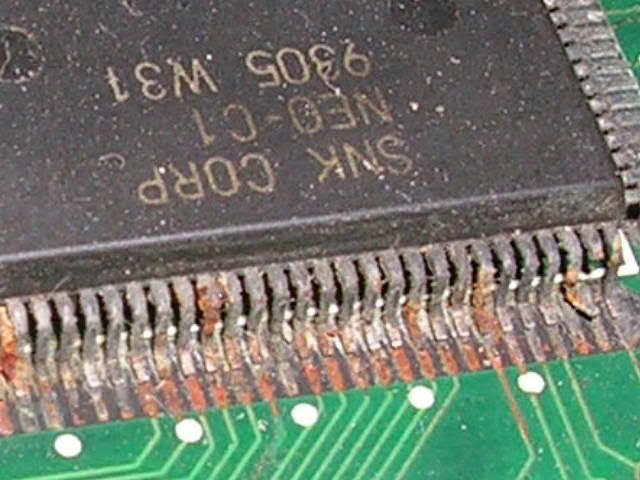
Good advice, this is what happened to my 1FS after I forgot to remove the Ni-Cd battery :(

NEO-C1custom.jpg
 

BIG BEAR

SHOCKbox Developer,
20 Year Member
Joined
Dec 14, 2001
Posts
8,431
That is the photo that inspired me to remove my battery and I thank you for that.
The battery is insignificant to me when they're hard to source and have the capacity to destroy the mobo.
BB
 

MKL

Basara's Blade Keeper
20 Year Member
Joined
Mar 8, 2002
Posts
3,686
You're lucky that it's the newer 4-slot with no traces around the battery, just the ground plane. On the older version the leakage would have corroded the traces that run under the battery and caused a crosshatch screen issue:

http://img473.imageshack.us/img473/7849/cn105lf.jpg
 

chaoticjelly

Kabuki Klasher
Joined
Sep 30, 2006
Posts
128
Thanks for the tip and for posting!

Which other models have this problem?

I have come accross this problem before on Commodore Amiga 500+ Computers and some accelerator cards.. damn leaking batteries ;)
 

chris1

POCKETBIKE NUT,
Joined
Oct 18, 2002
Posts
10,830
werejag said:
atleast you caught it early


Ditto..

..
Crazily,I was looking at my cabs yesterday thinking the same thing about the batteries in them..
 

Lime2K

Host for Orochi
Joined
Jul 30, 2004
Posts
762
And this is why I've replaced mine with a NiMh battery, attached with wires away from the board.
 

channelmaniac

Mr Neo Fix-it
15 Year Member
Joined
Nov 29, 2005
Posts
4,316
Lime2K said:
And this is why I've replaced mine with a NiMh battery, attached with wires away from the board.

Still won't always help. Back in my retail days (Radio Shack) I saw plenty of cordless phones where the bluish crystalline growths from the battery leakage traveled up the wires (inside the insulation) across the connector and across the circuit board!

You must still inspect the batteries regardless of the mounting.

RJ
 

chris1

POCKETBIKE NUT,
Joined
Oct 18, 2002
Posts
10,830
Well aint that a kick in the nuts..

After last night,thinking about this battery issue and then reading this thread this morning..I went and turned on all my MVS cabs....The last one to turn on was the 2 slot woody in my bedroom..It hasn't been turned on in over a month..
I flip it on and BAM the screen is all fuzzy with horizontal lines...It won't go into cross hatch via the service switch or with the carts out.

the screen looks the same no matter with the carts in or out..With the harness off i get a blue screen so the monitor is fine(my first thought)

I took a voltage reading from the harness and it sems to be reading below 5 volts so hopefully the power supply took a dump..
I'm going to attempt to raise the voltage in a a bit.(watching my newborn Son)
.Was thinking maybe I should pull the board out and try it in another cab first.(?)

..
I was considering selling the cab since I don't use it but this just puts the nail in it now..

 

Kuriakos

Kula's Candy
Joined
Dec 4, 2007
Posts
302
Damn! Checked my mobo today and this is what I found

*edit* - I'm retarded
 
Last edited:

FairlanePhantom

Mai's Apprentice
Joined
Mar 31, 2007
Posts
1,814
channelmaniac said:
Still won't always help. Back in my retail days (Radio Shack) I saw plenty of cordless phones where the bluish crystalline growths from the battery leakage traveled up the wires (inside the insulation) across the connector and across the circuit board!

You must still inspect the batteries regardless of the mounting.

RJ

True, same happens with battery cables on a car. The cables can look fine at a quick glance, but too many over look the fact that there can be corrosion within the lines.


I don't care much for saving high scores. I remove the battery as soon as I get my hands on boards.
 

Kuriakos

Kula's Candy
Joined
Dec 4, 2007
Posts
302
I don't even know where to begin...is this going to need some bypasses to fix?
 

Kuriakos

Kula's Candy
Joined
Dec 4, 2007
Posts
302
Any tips for removing the gunk? It feels like rubber and sticks to everything...
 

MKL

Basara's Blade Keeper
20 Year Member
Joined
Mar 8, 2002
Posts
3,686
Kuriakos said:
Damn! Checked my mobo today and this is what I found

That white stuff is just silicon to keep the battery in place. It's not possible to see from your pics if the battery has leaked or not. Anyway those 4-slots are getting quite old and their batteries should be changed as soon as possible to prevent damage.
 

Kuriakos

Kula's Candy
Joined
Dec 4, 2007
Posts
302
MKL said:
That white stuff is just silicon to keep the battery in place. It's not possible to see from your pics if the battery has leaked or not. Anyway those 4-slots are getting quite old and their batteries should be changed as soon as possible to prevent damage.

Well, I have the crosshatch problem, and there is a bunch of discoloration on the bottom side of the board....
 

aluisi

Geese's Thug
Joined
Apr 3, 2002
Posts
271
well i care about scores so where is a good place to get a replacement battery?
 

channelmaniac

Mr Neo Fix-it
15 Year Member
Joined
Nov 29, 2005
Posts
4,316
Kuriakos said:
Well, I have the crosshatch problem, and there is a bunch of discoloration on the bottom side of the board....

Then the battery leaked.

You'll have to remove it, clean up the silicone, remove/clean the battery gunk (Formula 409 Orange helps with this), and patch the eaten traces.

RJ
 

Murray

Akari's Big Brother
Joined
Aug 16, 2005
Posts
2,533
aluisi said:
well i care about scores so where is a good place to get a replacement battery?
I picked up a low-capacity Ni-Cd cordless phone battery from Radio Shack for mine. It's connected by wires / molex connectors now and velcroed to the bottom of the board.
 

raindog151

n00b
Joined
Feb 3, 2007
Posts
9
oh my

hate to sound dumb, but what's the easiest way to get to the mobo on a big red? do i have to unscrew the entire back off and remove the cover/wiring to remove the battery? i've never opened my cabinet beyond reaching in the coin door to switch volume.
 

Capt. Lurker

There's a post count?What the fuck isThat All abou
Joined
Jan 28, 2001
Posts
1,531
raindog151 said:
hate to sound dumb, but what's the easiest way to get to the mobo on a big red? do i have to unscrew the entire back off and remove the cover/wiring to remove the battery? i've never opened my cabinet beyond reaching in the coin door to switch volume.

x2
 

SSS

neo retired
Joined
Sep 27, 2002
Posts
10,771
raindog151 said:
hate to sound dumb, but what's the easiest way to get to the mobo on a big red? do i have to unscrew the entire back off and remove the cover/wiring to remove the battery? i've never opened my cabinet beyond reaching in the coin door to switch volume.


really? reach up through the coin door and unclasp the control panel, it will swing down
 

Capt. Lurker

There's a post count?What the fuck isThat All abou
Joined
Jan 28, 2001
Posts
1,531
SamuraiShodownSensei said:
really? reach up through the coin door and unclasp the control panel, it will swing down


I understand that, but do you have to remove the entire mobo? Do you just take the metal cover off, etc.?
 

SSS

neo retired
Joined
Sep 27, 2002
Posts
10,771
GT40PWR said:
I understand that, but do you have to remove the entire mobo? Do you just take the metal cover off, etc.?

yes, remove the board. should take 2 minutes with a screwdriver
 
Top