A few newbie questions

malkie13

Zero's Secretary
Joined
Mar 5, 2009
Posts
147
Hi folks! These forums have been an invaluable source of info, so I'm hoping someone knows the answer to these questions. I tried searching, but either my search-fu is no good with the engine the forums use, or I ask odd questions. Regardless, I could not seem to find these answers.

I only just got my cab a week ago (original 2 slot mvs big red), and other than the buttons being a little rough on the push, she's in great shape.

I've got an order in with Bob Roberts for a new set of buttons, as well as a few bits so that I can wire up a hidden credit button (cause I prefer to leave the thing not set to free play) as well as a "pause" switch (cause sometimes you just gotta hit the head), wired up to the jumper, both ideas from hardmvs.com.

What I'm wondering are the following:

1) What is the easiest way to keep track of which wires go where on the control board? All of them are capped with the slide on connectors, so teardown / hookup should be easy, but at two wires per switch, spread over 22 connections or so, that could get messy. I'm thinking I'll just attach labels to the wires as I disconnect them to let me know which button, etc, they go to. If there's some super-secret arcade repair guy method which works better, I'd love to know it.

2) I'd love to get my hands on one of the Happ plastic bezels (25" monitor), but I suspect I'll end up paying through the nose on shipping. Anyone know of Happ resellers in the California / Southern California neck of the woods?

3) In starting up my collection of MVS carts, I have two concerns:

3a) The first is boots, but there seem to be several "how-to" guides on how to spot 'em. I'm wondering how the heck to best open the carts to check the boards w/out nuking the label. Some of the labels are OLD and dry, and I foresee them just breaking in half or tearing.

3b) My second concern is storage. The shockboxes seem to be a good way to go about it (with or without insert, though obviously, inserts will look nicer all lined up). Where is a good source for these? Does anyone else have a different (cheaper?) solution.

4) Lastly, questions about the marquee and control panel plexi:

4a) Getting new, plain plexi is simple, and I have the right equipment to cut it. I'm wondering what the best way to make it look like the originals is. I think the original marquee is screen printed. I was thinking of going to my local, custom vinyl decal guy, and having him make two decals, one red, and one white, cut out appropriately, and then rigging up something to slide in the mini-marquees. Any better ideas out there?

4b) The control / joy panel also needs some love. Does anyone have a link to a good, higher res image of what the panel on a 2-slot original is supposed to look like? I could easily do something similar to the marquee (vinyl) to get it to look right.

4c) Mini marquees: Some games come with, some do not. Some you can buy, but often at /way/ more than I want to pay for a little sheet of plastic. Is there a good web resource for images of Minis out there? It would be easy enough to color laser some overhead projector film and simply back it with white to get a similar enough look.

Thanks for taking the time to read (and hopefully respond). I numbered my questions to make it easier to keep track of what I'm asking.

Joe
 

grantspain

Crazed MVS Addict
Joined
Dec 8, 2008
Posts
138
i can help on the tech question
to id the cp wires do exactly what you said with small stickers-i would normally do this by marking down the colour coding of the cable i.e red/blue = 1player start and so on but labels is a good idea
 

malkie13

Zero's Secretary
Joined
Mar 5, 2009
Posts
147
What I am probably going to do is use the 3" x 1" address labels, folder over each pair of wires, and then write which button they go to. Feels like it will be the cleanest way. If I do it right, I can just leave them that way too, for future repairs.

Thanks for the reply!

i can help on the tech question
to id the cp wires do exactly what you said with small stickers-i would normally do this by marking down the colour coding of the cable i.e red/blue = 1player start and so on but labels is a good idea
 

Xian Xi

JammaNationX,
15 Year Member
Joined
Dec 1, 2005
Posts
27,762
1) What is the easiest way to keep track of which wires go where on the control board? All of them are capped with the slide on connectors, so teardown / hookup should be easy, but at two wires per switch, spread over 22 connections or so, that could get messy. I'm thinking I'll just attach labels to the wires as I disconnect them to let me know which button, etc, they go to. If there's some super-secret arcade repair guy method which works better, I'd love to know it.

Just label like you say. Some people dont label them but just use a multimeter to check where it goes but labeling them would be a lot easier by far for you.

2) I'd love to get my hands on one of the Happ plastic bezels (25" monitor), but I suspect I'll end up paying through the nose on shipping. Anyone know of Happ resellers in the California / Southern California neck of the woods?

Try calling 888-289-4277, that's Happs Las Vegas branch.

3a) The first is boots, but there seem to be several "how-to" guides on how to spot 'em. I'm wondering how the heck to best open the carts to check the boards w/out nuking the label. Some of the labels are OLD and dry, and I foresee them just breaking in half or tearing.

Best way to open a cart without messing up the label is to not go past a 45 degree angle when you open it and do not leave the cart fully open at 180 degrees, that's where the creases come from.

3b) My second concern is storage. The shockboxes seem to be a good way to go about it (with or without insert, though obviously, inserts will look nicer all lined up). Where is a good source for these? Does anyone else have a different (cheaper?) solution.

For shockboxes you can buy them from southtown-homebrew.com for small orders but if you plan to but 10+ shock boxes you should go through BIG BEAR as he offers volume discounts on lots of 10 or more.

4b) The control / joy panel also needs some love. Does anyone have a link to a good, higher res image of what the panel on a 2-slot original is supposed to look like? I could easily do something similar to the marquee (vinyl) to get it to look right.

http://www.ur-pc.com/NeoGeoMVS/

4c) Mini marquees: Some games come with, some do not. Some you can buy, but often at /way/ more than I want to pay for a little sheet of plastic. Is there a good web resource for images of Minis out there? It would be easy enough to color laser some overhead projector film and simply back it with white to get a similar enough look.

Some people use transparency. For the images go to: http://www.arcadecrusade.com/gallery/v/minimarquees/evjrminis/
 

arfink

Crossed Swords Squire
Joined
Sep 7, 2008
Posts
187
As for opening cartridges, you just need to be very very careful. Sometimes with an especially crispy label you may want to we a q-tip very slightly in water and moisten it a very little so it can at least bend without cracking. Go easy on the water though, only a tiny bit.

As for storage, if you want to get into shock boxes that's cool, but for me I find that the crate that Maruchan Ramen Noodles come in is a good size for stacking cartridges in, just about perfect in fact. ;)

As for wire labeling, your method is just what I do too.
 

Marshall

New Challenger
Joined
Jan 25, 2008
Posts
54
1) What is the easiest way to keep track of which wires go where on the control board? All of them are capped with the slide on connectors, so teardown / hookup should be easy, but at two wires per switch, spread over 22 connections or so, that could get messy. I'm thinking I'll just attach labels to the wires as I disconnect them to let me know which button, etc, they go to. If there's some super-secret arcade repair guy method which works better, I'd love to know it.

I would reccomend using these. papers and stickers are easy to come off, so..
http://www.deepsurplus.com/Network-Structured-Wiring/Cable-Ties-With-Write-On-Tabs/4-Tab-Across-Cable-Marking-Tie-100-pieces-Whitebrfont-colorblackAs-low-as-2-05-font
 

malkie13

Zero's Secretary
Joined
Mar 5, 2009
Posts
147
Thanks for all the advice!

Xian Xi - You rock, I'll be bookmarking those links until I get to those particular parts of the fix-up. I'll also be calling the LV Happ number tomorrow, hopefully I can save some on the bezel. If it ends up being too much, I may try the craft board route, as I'm rather handy with a blade.

Arfink - You know, now that I look at them, the carts /do/ look like they'd fit nicely in a flat. I may just end up building a quick and dirty plywood solution, just for a little more durability. I have no intention of ending up with dozens and dozens, so I may take Xian's advise and contact BIG BEAR about a bundle of the shockboxes to keep the carts clean.

Marshall - I'm going to see if they have something like those at Radio Shack when I go this week. I need a couple of headphone patch cables so that I can get at them from the outside of the cab. I worry that the click ties may end up making too much clutter.

I should take some photos of the cab as she stands now, then more as I progress along.
 

ttooddddyy

PNG FTW,
Joined
Nov 29, 2001
Posts
8,335
Remember all the button switches (including joysticks) have a common ground, so there are really only half the connections you see.
 

Marshall

New Challenger
Joined
Jan 25, 2008
Posts
54
Marshall - I'm going to see if they have something like those at Radio Shack when I go this week. I need a couple of headphone patch cables so that I can get at them from the outside of the cab. I worry that the click ties may end up making too much clutter.

It's o.k. you do it your own way, but you don't need to worry that much, since it's pretty small and won't take much space as you think. They are also sold in various sizes and shapes,that arcade manufactures uses them often to label cables too.

http://imagepot.net/view/123661814827.jpg

From my experience, strength holding wires withought getting any label torn off is what most needed, since you actually plug in/off wires often with some strength. Stickers will come off for sure after a while because, they dry out and those sticky glue left on wires are just dirty and messy. There will be times you need to cut off wires or re connect quick connectors etc. so, removing sticky stickers are just disgusting. So I recommend you to put labels a bit far from the end, even though labeling near end makes it easy to identfy, you know. Don't forget to re-tighten quick connectors for buttons once in a while. They start to come off easy by the vibrations pressing buttons, after re-pulgging several times.
 

malkie13

Zero's Secretary
Joined
Mar 5, 2009
Posts
147
Marshall: I picked up a smaller pack at the Shack yesterday, they may or may not work (remember, this is the thin thin thin wires for the joys and buttons we're talking about). But there is ample room in there.

Does it matter which wire goes to which prong on the microswitch? It shouldn't, not really anyway, since it's just closing a circuit, and it would be nice to not have to get /that/ insane with labeling.

Question on the T-molding. That's just glued on, isn't it? How much of a pain in the butt is that to yank off and replace? Its' got some pretty torn up parts, and while it doesn't affect the function at all, it would be nice to get this cab looking pretty.

Another question, as I /may/ have to recut a new piece of plexi for the control panel overlay. What diameter hole bit is needed for the buttons / joysticks? I'm sure I could check, but until I'm ready to do full teardown, I'd rather leave it together and working (since I play at lunch, hehe), but I'd like to pick up bits (if needed) before the fact.

Thanks again, folks.
 

chewurface

Krauser's Shoe Shiner
Joined
Mar 9, 2006
Posts
232
Does it matter which wire goes to which prong on the microswitch? It shouldn't, not really anyway, since it's just closing a circuit, and it would be nice to not have to get /that/ insane with labeling.

I think it does. I want to say that when I tested the switches in my cab the prongs were different. E.g. one was closed with the button down and open with the button up, and the other prong was the opposite: open when down and closed when up.
 

malkie13

Zero's Secretary
Joined
Mar 5, 2009
Posts
147
I think it does. I want to say that when I tested the switches in my cab the prongs were different. E.g. one was closed with the button down and open with the button up, and the other prong was the opposite: open when down and closed when up.

*nod* That I had assumed, as the switches have 3 prongs a piece. What I meant was, using the same two prongs as currently wired, does it matter which wire goes to which?

Prong 1, 2, 3, Wire A, B
Current 1-A, 2-B, 3-nothing
Change to 1-B, 2-A, 3-nothing

It /shouldn't/ affect anything, should it? Again, if it needs to stay the way it is, that's fine, just means I need to label more anal-retentively when I take the control panel apart.
 

discgolfer72

Crossed Swords Squire
Joined
Nov 14, 2008
Posts
180
yup it does matter

this is how most common mocro switches are setup you will want to set tyour buttons to no
so the black (ground wire)goes to the common and you other wire goes to the no


DSC03418.jpg
 
Last edited:

malkie13

Zero's Secretary
Joined
Mar 5, 2009
Posts
147
Oooh, right. I totally forgot about the common ground. So yeah, that'll make a difference. I'll need to peek under the hood, I don't rightly recall if all the grounds are the same color (I'd assume so). That'll make labeling much easier. Thanks!

Any input on the t-molding / holes?
 

discgolfer72

Crossed Swords Squire
Joined
Nov 14, 2008
Posts
180
i drill all my button holes with a 1 1/8 hole saw

on the mvs the cp has larger than 1 1/8 holes for the joysticks holes but i usually use the 1 1/8 bit for my joustich holes also
 
Last edited:

Marshall

New Challenger
Joined
Jan 25, 2008
Posts
54
malkie13 wrote:
(remember, this is the thin thin thin wires for the joys and buttons we're talking about).

I don't know what kinds of ties u bought but,you can just buy the one that fits. I know what kinds of wire you're talking about. I just gave you some advice, you asked for. If the ties are too big, then just double tie it on would do.
 

chewurface

Krauser's Shoe Shiner
Joined
Mar 9, 2006
Posts
232
Oooh, right. I totally forgot about the common ground. So yeah, that'll make a difference. I'll need to peek under the hood, I don't rightly recall if all the grounds are the same color (I'd assume so). That'll make labeling much easier. Thanks!

Any input on the t-molding / holes?

All the ground wires should be black (maybe green, but they're black in my cab).
 

malkie13

Zero's Secretary
Joined
Mar 5, 2009
Posts
147
Another question:

The cab has a 2-slot MVS inside, with the sliding volume adjusters for both speaker and headphones. I'm planning to run a pair of extensions to the outside (probably the control panel) for the headphones so my wife doesn't kill me when I bring this home. That said, I'm wondering if there might be a way to externally wire a volume control for both the speaker and headphones to the outside. For the speaker, an on / off switch would even work, as once that is set, it's not likely to need tweaking much (also, it's quick enough to get inside). Headphones are more pressing. While I could get the little mini volume doodads from radio shack, that seems inelegant.

Would it be better to put something inline with the extension wire so that I'm not mucking about with the mobo (and just leave the headphone volume there cranked)?

Thoughts? Suggestions?

Thanks!
 

malkie13

Zero's Secretary
Joined
Mar 5, 2009
Posts
147
Got my goodie box from Bob today, I'll be giving the control panel the stink-eye sometime soon. I think I'm going to end up redoing it altogether.

I'm considering buying the overlay from www.arcadeoverlays.com, has anyone gotten one before? Worth the money? Decent, or kinda shoddy feeling?

I also have a pair of the MV-LEDs on the way, but no harnesses. Does anyone know a good source in the US for the connector? I can manage rigging up 13 wires okay, but I'm a little foggy on where to get a connector from, or what to look for (a part number, perhaps)?

I had a though regarding my last questions too:

For the speaker, I'm thinking of mounting a subtle rocker switch on top of the cab (where it'll be out of sight) that's inline with one of the speaker leads. That way I can just flip it on and off. Shouldn't be a problem doing it that way, should it?

For the headphones, shouldn't I just be able to put a rotary pot. inline somewhere and use that for a volume knob? It's been 15 years since I took electronics in High School, so I'm a hair rusty.

Any feedback is, as always, greatly appreciated.

(Oh, I should be taking some "Before" pictures soon to post. And I was wrong, it's not a Big Red cab, it's one of the 2-slot slims that are in every pizza parlor everywhere).
 

malkie13

Zero's Secretary
Joined
Mar 5, 2009
Posts
147
Some progress, nothing huge. Marquee is working (starter was dead), coin slot lights work (dead bulbs). Got the second speaker wired up (soooo easy off the jamma harness). Wired in the hidey buttons for credit input w/out having to pop in quarters or leave it on freeplay.

Starting now to work on the volume / cutoff for the speakers.

Unfortunately, I had a dumb moment and picked up an SPST thinking I could just cut the shared ground to the speakers to cut them off completely, but no go. It just cuts the volume dramatically, but not all the way. I'll be picking up a DPST and using that on the + lines. That should, hopefully, do it.

In trying to wire in a volume control for the speakers I've run into a problem.

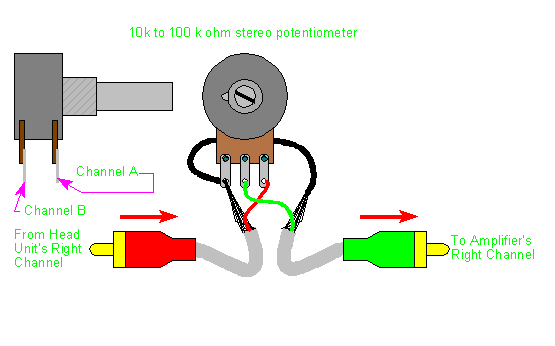
Using a Dual Ganged 100k Potentiometer (specifically for use as a volume control), it only adjusts the volume in the last 5-10% of its rotation and it's SO super short that it's useless for a volume control. I just have this inline from the jamma harness to the speakers.

Doing some digging, it seems this may need to actually go in place from the signal side, before any sort of amplification, rather that from the harness to the speakers. Sadly, I haven't the foggiest way to go about doing this. I've got a 2 slot mobo.

Any help would be great. If there's another way to get an externally adjustable volume control for the speakers (rather than having to open the cab to do so), I'd love to hear it.

Thanks!
 

Hewitson

Metal Slug Mechanic
Joined
Mar 6, 2008
Posts
2,198
The reason that pot doesn't seem to do much until you are right at the end of it is because it is logirithmic. It sounds like you have it connected backwards.

You have it in the right spot though, after the amplification is correct. Is your PCB volume turned up to a suitable level? If using an external volume control you'll want all your boards to be at almost full volume.
 
Last edited:

malkie13

Zero's Secretary
Joined
Mar 5, 2009
Posts
147
I'm fairly sure it's hooked up right, like this:

volcont.gif


(note, not my graphic, just easier way of explaining what goes where)

For each channel (left and right). Ground runs to each gang and to each speaker.

Input (from Jamma) goes to terminal 3, output to speaker hot goes from terminal 2. When I put my multimeter to it, the resistance is a nice gradual increase as the pot is rotated.

And yeah, with the volume nearly 100% from the mobo, this is almost mute for 90% of the turn, then BAM, full blast.
 
Last edited:

Xian Xi

JammaNationX,
15 Year Member
Joined
Dec 1, 2005
Posts
27,762
I wish I could help but I never used a dual pot like that.

All I know is that for a regular pot I wire mine as:

Pin 1: Ground
Pin 2: Input
Pin 3: Output

but as far as it looks, it looks correct.
 

malkie13

Zero's Secretary
Joined
Mar 5, 2009
Posts
147
Dual ganged is more or less like a pair of pots that turn at the same time. Wiring is pretty damn straightforward. And like I said, measuring the resistance, it has a nice smooth increase / decrease, so I'm friggin /baffled/ over why it's behaving this way.
 
Top