Upside down monitor!

taitai

Genbu's Turtle Keeper
Joined
Apr 25, 2004
Posts
2,393
When I put in my Street Fighter 2 board, I found out my screen was mounted upside down some how. SF2 has a flip screen dip, but the neo board I'm obtaining in a day or so doesn't.

Now, rather than actually lift that 29in thing around I'm wondering if there's any other options? My dad mentioned turning the CRT's choke around, but given the sensitive nature of CRTs, I'd rather drop a CRT and break it than do something stupid and get a few amps in my body.

I own an original Sega Astro City cabinet, if that helps.
 

chris1

POCKETBIKE NUT,
Joined
Oct 18, 2002
Posts
10,830
Though I'm not sure but I think the Monitor in a Sega Astro City cabinet is rotate-able (?)..........if it is.....The best thing to do is Rotate it back to it's correct location/position...(As in the easiest thing to do)
As it should spin all the way around.. :conf:
At one time it probably was rotated too far ..

Otherwise it would be that turning the CRT's choke around. :eek: ..or I've heard of a wires snip/reversal that IMO is chancy to do..
I think it was member ngt who did the wire,reversal in the back of the monitor of his capcom cab...
He had the same flipped monitor problem..
 

taitai

Genbu's Turtle Keeper
Joined
Apr 25, 2004
Posts
2,393
well, the odd part is is that the monitor board is properly mounted. It was originally in horizontal mode.

And yes, I can turn it, but it doesn't have any mechanism to help me. so I get to heave the bastard up and around by hand. I'm not too physically strong @_@
 

chris1

POCKETBIKE NUT,
Joined
Oct 18, 2002
Posts
10,830
taitai said:
well, the odd part is is that the monitor board is properly mounted. It was originally in horizontal mode.

And yes, I can turn it, but it doesn't have any mechanism to help me. so I get to heave the bastard up and around by hand. I'm not too physically strong @_@


You need to have a few people help you and be carefull..
 

ttooddddyy

PNG FTW,
Joined
Nov 29, 2001
Posts
8,335
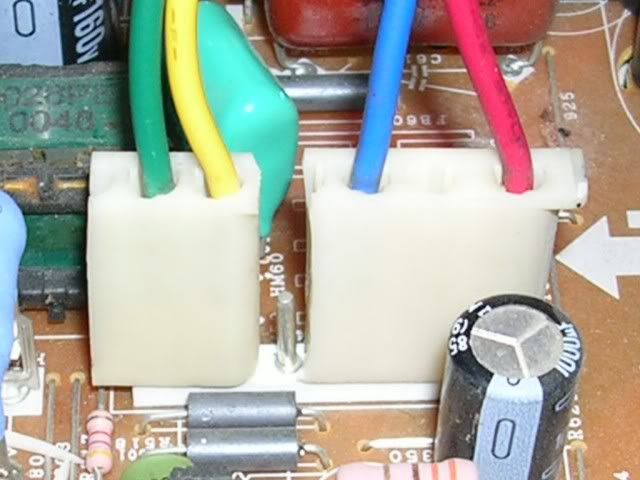
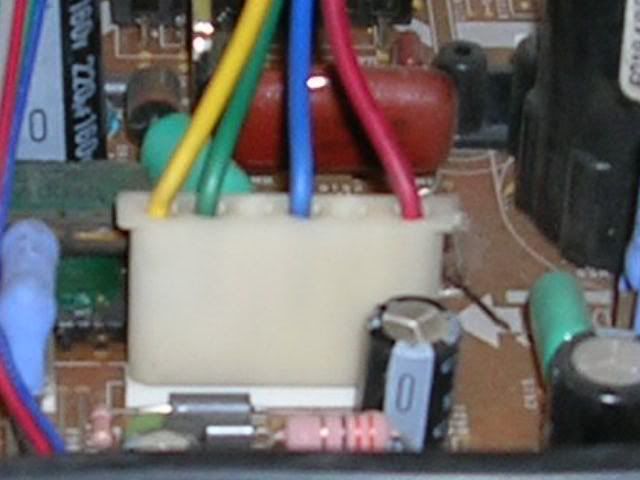
No need to rotate the crt, simply split the deflection yoke plug and reverse the horizontal and vertical scans.

scanplug1.jpg

BEFORE

scanplug2.jpg

AFTER
 
Last edited:

taitai

Genbu's Turtle Keeper
Joined
Apr 25, 2004
Posts
2,393
ttooddddyy said:
No need to rotate the crt, simply split the deflection yoke plug and reverse the horizontal and vertical scans.

scanplug2.jpg

What monitor board is that from?
 

ttooddddyy

PNG FTW,
Joined
Nov 29, 2001
Posts
8,335
That pic is not from a monitor, its a TV, but the principle is the same (I had a TV at hand and used it just for illustration).

Follow the wires from the deflection yoke to where it plugs into the monitor board, take a piccy and post it here or email so that I can give instructions.

The method is safer than removing and physically rotating the crt, and a lot less hastle.
 

stuffmonger

Baseball Star Hitter
Joined
Mar 9, 2005
Posts
1,254
ttooddddyy said:
No need to rotate the crt, simply split the deflection yoke plug and reverse the horizontal and vertical scans.

scanplug1.jpg

BEFORE

scanplug2.jpg

AFTER
ttooddddyy> is it just me, or did you just move the green and yellow wires down a pin?
OOP... nevermind... I see now...
 

ttooddddyy

PNG FTW,
Joined
Nov 29, 2001
Posts
8,335
stuffmonger said:
ttooddddyy> is it just me, or did you just move the green and yellow wires down a pin?
OOP... nevermind... I see now...


On the "after" pic you see a bare pin. Thats a blank location pin.

Optical illusion :spock:
 

NGT

J. M Club, ,
20 Year Member
Joined
Jul 20, 2002
Posts
4,762
is that cps2? or cps1? I know cps2 you can flip the monitor inside the menu options...not sure about cps1. I had a problem with a monitor that was upside down in the cab and I flipped the monitor in the menu options....I later needed the monitor right side up for other setups so I flipped the yok or whatever....just a thought.
 

taitai

Genbu's Turtle Keeper
Joined
Apr 25, 2004
Posts
2,393
ttooddddyy said:
On the "after" pic you see a bare pin. Thats a blank location pin.

Optical illusion :spock:

NEW PROBLEM

I followed the manual's diagram and found the appropriate plug. I went ahead and did what you(and apparantly, it) suggested.

Instead of having an upside down screen,now it's mirrored!

Should I try to find another pair of wires to manipulate? Or should I just turn it around manually?
 

ttooddddyy

PNG FTW,
Joined
Nov 29, 2001
Posts
8,335
taitai said:
NEW PROBLEM

I followed the manual's diagram and found the appropriate plug. I went ahead and did what you(and apparantly, it) suggested.

Instead of having an upside down screen,now it's mirrored!

Should I try to find another pair of wires to manipulate? Or should I just turn it around manually?

You have reversed the horizontal scan, you need to reverse the vertical scan (on my pic thats the yellow and green wires)

IMPORTANT: Make sure you do not mix up the scans, reversing the vert and/or horizontal is fine, but never cross the two. That will lead to greif.

If your not sure post or send me a pic I will confirm what you need to do.
 

taitai

Genbu's Turtle Keeper
Joined
Apr 25, 2004
Posts
2,393
ttooddddyy said:
You have reversed the horizontal scan, you need to reverse the vertical scan (on my pic thats the yellow and green wires)

IMPORTANT: Make sure you do not mix up the scans, reversing the vert and/or horizontal is fine, but never cross the two. That will lead to greif.

If your not sure post or send me a pic I will confirm what you need to do.

Actually, I figured that out from reading the manual(despite it being in Japanese and me having to look up every other goddamn kanji). My dad and I were just pulling and replugging in cables until it came up fine >_>;;;;
 
Top