RAM Replacing - interested in a tutorial?

Iain

n00b
Joined
Mar 25, 2005
Posts
25
Hi,

Now looking at replacing the 28 pin soic 62256 chip on my neo 6 slot ....

I have sourced replacements in the right package shape (I will know when I place it in if it has the right pinout .- no data sheet that I can find for this make ..lol).

I can do this two ways - either using an smd station or using a normal soldering iron (I have done both before !).

So one comment and one question .....

1. Once I know the chips work I will release details so you can all repair your beloved neo's !

2. Would anyone like me to do a tutorial on changing it and if so which way ?? or both ???

Won't be straight away but won't be long either !!!!

Iain
 

Iain

n00b
Joined
Mar 25, 2005
Posts
25
Hi,

Yes it is a 62256 soic but the manufacturer is EliteMT .... taiwanese manufacturer. Unfortunately there doesn't appear to be any data sheets and I am aware that there are pinout differences between say a Hitachi 62256 soic and a Cypress 62256 soic ..... these things are sent to try us !!!

It will be a case of quickly slam the new one in and watch for magic smoke escaping ....... should be ok though !!!

Iain
 

mainman

CPS2 Person.,
20 Year Member
Joined
Mar 26, 2001
Posts
3,880
Iain said:
Hi,

Yes it is a 62256 soic but the manufacturer is EliteMT .... taiwanese manufacturer. Unfortunately there doesn't appear to be any data sheets and I am aware that there are pinout differences between say a Hitachi 62256 soic and a Cypress 62256 soic ..... these things are sent to try us !!!

It will be a case of quickly slam the new one in and watch for magic smoke escaping ....... should be ok though !!!

Iain

Worse case scenario you will fry the ram chip you just changed nothing more. Most likely case the chip will not work provided it has the wrong pin out. I myself have personal replaced these chips and had no problem want so ever. I got my chips from jameco electronics and the pinout was a exact match. By the way I suggest using a regular soldering iron and not a flux soder machine as long as the chips have not been glued down with epoxy.
 

MKL

Basara's Blade Keeper
20 Year Member
Joined
Mar 8, 2002
Posts
3,686
mainman said:
I myself have personal replaced these chips and had no problem want so ever. I got my chips from jameco electronics and the pinout was a exact match.

What chips did you use exactly? Link please. Because the last time I checked the 62256 ram chips from Jameco came in the wrong package (SOJ) that doesn't match the location where the old chips were soldered on the MVS boards (as I pointed out here). Did you hardwired them?
 

Lime2K

Host for Orochi
Joined
Jul 30, 2004
Posts
762
When you do make your tutorial, make sure to put in a section on figuring out which f'n ram chip is the problem. Thanks!
 

dogtoy

Haomaru's Blade Shiner
Joined
Nov 24, 2003
Posts
689
Lime2K said:
When you do make your tutorial, make sure to put in a section on figuring out which f'n ram chip is the problem. Thanks!

Can't you do this by shorting two of the i/o lines, making the bios read 00 for that chip? I did that when I replaced one of the 5814's in my 4-slot. Read 0055 with the bad one shorted and read 0F00 with the good one shorted.

Seems like this may work for all the other ram chips too.

-DT
 

mainman

CPS2 Person.,
20 Year Member
Joined
Mar 26, 2001
Posts
3,880
MKL said:
What chips did you use exactly? Link please. Because the last time I checked the 62256 ram chips from Jameco came in the wrong package (SOJ) that doesn't match the location where the old chips were soldered on the MVS boards (as I pointed out here). Did you hardwired them?

It the same part you are referring to here http://www.jameco.com/webapp/wcs/st...toreId=10001&catalogId=10001&productId=141233

I have the IC in my hand right now and I have personally physically replaced and tested the IC on my 1 slot
 

MKL

Basara's Blade Keeper
20 Year Member
Joined
Mar 8, 2002
Posts
3,686
mainman said:
It the same part you are referring to here http://www.jameco.com/webapp/wcs/st...toreId=10001&catalogId=10001&productId=141233

I have the IC in my hand right now and I have personally physically replaced and tested the IC on my 1 slot

I'm talking from experience not theory: I did order those chips from Jameco. Here's some photographic evidence of the problem:

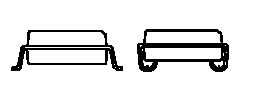
The Jameco ram comes in a SOJ package, where the J refers to the shape of the pins, as opposed to the "gull-wing" ones of the original Neo ram. Here's the two chips side by side (original on the left, Jameco on the right):

http://img.photobucket.com/albums/v65/nassivera/neoram1.jpg
http://img.photobucket.com/albums/v65/nassivera/neoram2.jpg

As can be seen the pins on the original chip stick out while the pins on the Jameco ram bend inwards and then go back into the chip again. The two packages are clearly not compatible with each other when it comes to soldering them on a PCB and the solder pads on the MVS board are made to accept gull-wing pins only. When the Jameco ram is positioned in the center of the outline where the old chip was located neither pin row is in contact with the PCB pads:

http://img.photobucket.com/albums/v65/nassivera/neoram3.jpg
http://img.photobucket.com/albums/v65/nassivera/neoram4.jpg

And it goes without saying that if you position one pin row on the PCB pads on one side, then you'll have a huge gap on the other side:

http://img.photobucket.com/albums/v65/nassivera/neoram5.jpg
http://img.photobucket.com/albums/v65/nassivera/neoram6.jpg

The bottom line is that ram chips on MVS boards are not meant to be replaced by SOJ packages. Ghetto methods such as hardwiring (just use a DIP ram at that point!) or even more desperate methods one can think of like adding blobs of solder to cover the gaps between chip pins and PCB pads will result in a shitty job and are absolutely to be avoided (esp. the latter where you can easily bridge pins). Do things the right way and get the right ram in the correct package.
 

mainman

CPS2 Person.,
20 Year Member
Joined
Mar 26, 2001
Posts
3,880
MKL said:
I'm talking from experience not theory: I did order those chips from Jameco. Here's some photographic evidence of the problem:

The Jameco ram comes in a SOJ package, where the J refers to the shape of the pins, as opposed to the "gull-wing" ones of the original Neo ram. Here's the two chips side by side (original on the left, Jameco on the right):

http://img.photobucket.com/albums/v65/nassivera/neoram1.jpg
http://img.photobucket.com/albums/v65/nassivera/neoram2.jpg

As can be seen the pins on the original chip stick out while the pins on the Jameco ram bend inwards and then go back into the chip again. The two packages are clearly not compatible with each other when it comes to soldering them on a PCB and the solder pads on the MVS board are made to accept gull-wing pins only. When the Jameco ram is positioned in the center of the outline where the old chip was located neither pin row is in contact with the PCB pads:

http://img.photobucket.com/albums/v65/nassivera/neoram3.jpg
http://img.photobucket.com/albums/v65/nassivera/neoram4.jpg

And it goes without saying that if you position one pin row on the PCB pads on one side, then you'll have a huge gap on the other side:

http://img.photobucket.com/albums/v65/nassivera/neoram5.jpg
http://img.photobucket.com/albums/v65/nassivera/neoram6.jpg

The bottom line is that ram chips on MVS boards are not meant to be replaced by SOJ packages. Ghetto methods such as hardwiring (just use a DIP ram at that point!) or even more desperate methods one can think of like adding blobs of solder to cover the gaps between chip pins and PCB pads will result in a shitty job and are absolutely to be avoided (esp. the latter where you can easily bridge pins). Do things the right way and get the right ram in the correct package.


NO, NO, NO, NO

I do not know what jameco shipped you but the ram chips they shipped me are J shaped like the originals. What you have doesn't even match the description or picture on that site. I am not on crack man, I know what I am looking at and I know what I am taking about. It clear that the IC you have are what you described them as but the one I got from them are not the same. Do I have to show you the chips they shipped me to convince you I am not on PCP!!! Guy why don't you just bend the pins into a j shape yourself, the end of the pin that bends under the IC should be able to move.

OK here is what I got on the left is the original chip and on the right is the jameco chip, I bought these things one month ago


http://i4.photobucket.com/albums/y109/niceguy60/untitled.jpg

http://i4.photobucket.com/albums/y109/niceguy60/untitled2.jpg

They say a picture is worth a thousand words, there' s 2 thousand
 
Last edited:

MKL

Basara's Blade Keeper
20 Year Member
Joined
Mar 8, 2002
Posts
3,686
mainman said:
NO, NO, NO, NO

I do not know what jameco shipped you but the ram chips they shipped me are J shaped like the originals.

You are confused, your chips are the gull-wing type (like the originals), the J-shaped type (called SOJ) is the wrong type for the Neo Geo:

SOICSOJ.bmp

(gull-wing on the left, SOJ on the right)

Now, if you check the Jameco link you posted as well as the other 32k*8bit rams in their catalog you'll see that they're all described as SOJ (except the Cypress ones that have the wrong pinout though). This means that I got what I paid for, it was my fault that I didn't notice the SOJ in the description when I placed my order, so I can't complain. In your case, on the other hand, you got a normal SOP chip when the description said SOJ, so you got (by mistake?) the right type for your purpose but not what you should have received.

The upshot is that Jameco is not a reliable source since the items one receives may or may not match the description on their website. However it must be stressed that the odd case is yours not mine as I got the item as described.

mainman said:
Guy why don't you just bend the pins into a j shape yourself, the end of the pin that bends under the IC should be able to move.

Though not impossible this is the kind of ghetto method I abhor. I'm not trying to get my MVS to work and play my games again: I have several other mobos in working condition for that (not to mention that with a unibios you can get around the bad ram problem and still play the games). What I want is the correct ram in the correct package. And I know where to find it locally but I'd have to drive a few miles out of town and since I'm lazy I thought I'd give it a try with Jameco. That's it...
 
Last edited:

ttooddddyy

PNG FTW,
Joined
Nov 29, 2001
Posts
8,335
I think mainmans pics are of the modified J type to gullwing pins (improvisation) ?
As pointed out already,the jameco pin out issue is now known. Thanks to your observation MKL.
 

MKL

Basara's Blade Keeper
20 Year Member
Joined
Mar 8, 2002
Posts
3,686
ttooddddyy said:
I think mainmans pics are of the modified J type to gullwing pins (improvisation) ?

Good observation toddy, it may very well be possible: I've just reshaped myself the J pins of a SOJ chip into gull-wing pins and it doesn't even look that bad:

http://img.photobucket.com/albums/v65/nassivera/neoram7.jpg

So even if you end up getting the wrong SOJ package, you can always mod it. Not sure if I'm going to install this on the MVS mobo though...

Anyway, I've seen that digikey now carries a suitable RAM in the correct package, it's part no. LH52256CN-70LL (Sharp manufacturer). Minimum order is 25 though which means more than 100 bucks.
 

ttooddddyy

PNG FTW,
Joined
Nov 29, 2001
Posts
8,335
I have a micro surgery job to do on a smashed Truxton 2 jamma smd ceramic hybrid interface device- anything is possible given patience ;)
 

mainman

CPS2 Person.,
20 Year Member
Joined
Mar 26, 2001
Posts
3,880
MKL said:
You are confused, your chips are the gull-wing type (like the originals), the J-shaped type (called SOJ) is the wrong type for the Neo Geo:

SOICSOJ.bmp

(gull-wing on the left, SOJ on the right)

Now, if you check the Jameco link you posted as well as the other 32k*8bit rams in their catalog you'll see that they're all described as SOJ (except the Cypress ones that have the wrong pinout though). This means that I got what I paid for, it was my fault that I didn't notice the SOJ in the description when I placed my order, so I can't complain. In your case, on the other hand, you got a normal SOP chip when the description said SOJ, so you got (by mistake?) the right type for your purpose but not what you should have received.

The upshot is that Jameco is not a reliable source since the items one receives may or may not match the description on their website. However it must be stressed that the odd case is yours not mine as I got the item as described.


Though not impossible this is the kind of ghetto method I abhor. I'm not trying to get my MVS to work and play my games again: I have several other mobos in working condition for that (not to mention that with a unibios you can get around the bad ram problem and still play the games). What I want is the correct ram in the correct package. And I know where to find it locally but I'd have to drive a few miles out of town and since I'm lazy I thought I'd give it a try with Jameco. That's it...

No that was a typo on my part I meant to say sop. About the description on their web page the verbal description say soj but the picture is clearly that of a sop chip. You got to notice that
 

MKL

Basara's Blade Keeper
20 Year Member
Joined
Mar 8, 2002
Posts
3,686
mainman said:
No that was a typo on my part I meant to say sop. About the description on their web page the verbal description say soj but the picture is clearly that of a sop chip. You got to notice that

And you got to notice that the picture is the same as the one used for the Cypress ram:

http://www.jameco.com/webapp/wcs/st...toreId=10001&catalogId=10001&productId=135895

They used the same pic but deleted the Cypress logo :smirk:

Never ever rely upon pics when buying stuff online

Anyway, in the end I decided to install the modded SOJ chip:

http://img.photobucket.com/albums/v65/nassivera/neoram8.jpg

Not really nice to look at but it works fine. I was still getting the error message after installing it: turned out to be an invisible broken trace on solder side.
 

Adamaki

Haomaru's Blade Shiner
Joined
Oct 7, 2004
Posts
678
How difficult is it to solder those surface mounted chips? It looks like a nightmare with all those traces running inbetween the pins. Looks like you've done a pretty neat job there MKL.
 

Iain

n00b
Joined
Mar 25, 2005
Posts
25
In answer to the above as long as you have a steady hand and a small degree of patience it is very very easy to change these type of packages using either hot air (smd rework) or indeed a fine tipped soldering iron and a pair of very fine tweezers (or a blunt fine needle in a cork if we are going for the real cowboy approach :eek: )

Iain
 

mainman

CPS2 Person.,
20 Year Member
Joined
Mar 26, 2001
Posts
3,880
MKL said:
And you got to notice that the picture is the same as the one used for the Cypress ram:

http://www.jameco.com/webapp/wcs/st...toreId=10001&catalogId=10001&productId=135895

They used the same pic but deleted the Cypress logo :smirk:

Never ever rely upon pics when buying stuff online

Anyway, in the end I decided to install the modded SOJ chip:

http://img.photobucket.com/albums/v65/nassivera/neoram8.jpg

Not really nice to look at but it works fine. I was still getting the error message after installing it: turned out to be an invisible broken trace on solder side.

That doesn't look all that ghetto
 

Lime2K

Host for Orochi
Joined
Jul 30, 2004
Posts
762
dogtoy said:
Can't you do this by shorting two of the i/o lines, making the bios read 00 for that chip? I did that when I replaced one of the 5814's in my 4-slot. Read 0055 with the bad one shorted and read 0F00 with the good one shorted.

Seems like this may work for all the other ram chips too.

-DT

Which pins are the I/O lines? I've got 4 slot with a backup ram error (ADRS 00D00C0C W5555 R7555) and a video ram error (A00008000 W5555 R5F5F)

Thanks for teh help!
 

dogtoy

Haomaru's Blade Shiner
Joined
Nov 24, 2003
Posts
689
Don't know much about those chips, check the datasheet to see the pinout. You actually have to short one of the the I/O lines to ground. On the 5814 I used pin 11 and 12 (I/O 3 and GND respectively). Doing this will make that chip read back as 00 instead of 55 (or whatever the read error is instead of 55, F0 for instance).

Hope this helps a bit.
Cheers,
-DT
 
Top